Free online tool
Online DCA Calculator
See how much your capital can grow with steady monthly contributions and the power of compounding. Change the numbers and the results update instantly.
- Free, no sign-up
- Stays on your device
- Year-by-year chart
How to use it
- 1
Fill in the amounts
Initial capital, monthly contribution, years and expected return.
- 2
See the result
The chart and the statistics follow every change in the numbers.
- 3
Keep it
Copy the calculation link or save it to your plan.
Your numbers
The result
Future Value
€144,572.72
Total Contributions
€58,000.00
Gains
€86,572.72
60% of the value60% of the final amount
Your scenarioi
€10,000 + €200/month · 20 years · 7%
Final value €144,573 · contributions €58,000 · gains €86,573
Your data stays yours
Everything happens inside your browser. Nothing is sent and nothing is stored with us: Logifin has no user accounts and never sees your numbers.
Want to continue on another device? Copy the calculation link and open it wherever you like. The calculation travels inside the link itself, not through us.
Do you also want inflation, TER and the Compound Crossover?
The Investment Calculator does the same and adds the real value after inflation, the cumulative cost of the ETF and the detailed table by year.
Open the Investment Calculator →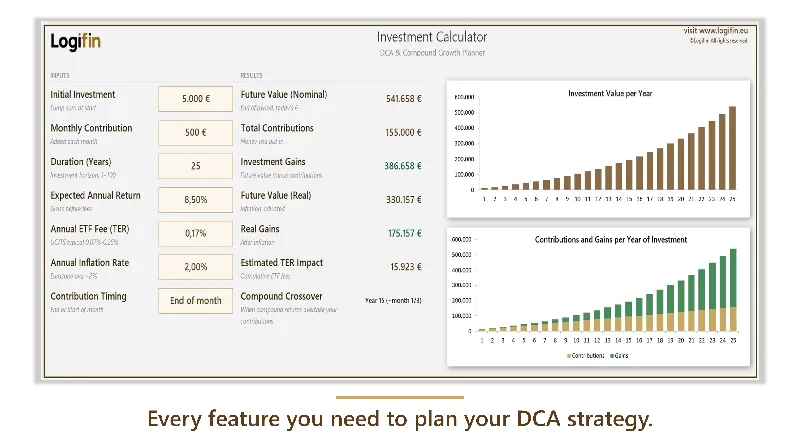
Premium
Investment Calculator
The calculation in your own sheet: open it wherever you like, show it to whoever you like.
Your own file, forever: it opens offline and you change it as you like.
Frequently asked questions
Where are the figures I enter stored?
Nowhere. The calculation happens as you type, inside the page. When you close the tab, the fields are simply gone, unless you save the scenario to My Plan or keep the calculation link.
How do I continue the same calculation on another device?
Press the share button. A link is copied that carries the values inside it. Open it on your phone or send it anywhere you like: the exact same calculation appears.
Does the calculation link pass through Logifin?
Only as far as needed to open the page: the values travel inside the link itself and, like any address, reach the server at the moment it opens. We do not store them, we do not link them to a person and we see neither who sent the link nor to whom.
What is My Plan?
Your personal space for scenarios: you save a calculation under a name and find it again later, so you can compare alternatives. It holds up to 30 scenarios and lives, like everything else, in your browser.
How many scenarios does My Plan hold?
Up to 30 on each device. When you save the 31st, the oldest one is quietly removed. Saving the same scenario twice shows it twice with the same name, unless you rename it before you save. Delete what you no longer need, or keep a copy with the export.
Do My Plan scenarios show on my phone as well?
They stay on the device where you saved them and they do not sync. If you want a scenario elsewhere, open the calculation link there and save it again.
If I clear my browser, do I lose My Plan?
Yes, the scenarios are deleted together with your browsing data. For the scenarios you do not want to lose, keep their link as well: it reopens the calculation at any time.
Are the results a prediction of the future?
No. It is a mathematical projection based on the assumptions you set: return, time horizon and contributions. It helps you understand how the numbers work, not guess the market.
What to try next
Calculate how far a monthly amount can grow and what it will buy after inflation.
→