Organise your finances with practical tools
Everything you need for full control of your finances and investments.
Free
Premium Online Tools
Free, inside the site, no signup. Everything you calculate stays on your device.
Investment Calculator
Calculate how far a monthly amount can grow and what it will buy after inflation.
Budget Tracker
Organise income and expenses to see how much you manage to keep each month.
Portfolio Tracker
Track what you have bought and how it has performed, in euro and as a percentage.
Premium
Make the most of the Premium Excel tools
Your own file, forever: it opens offline and you change it as you like.
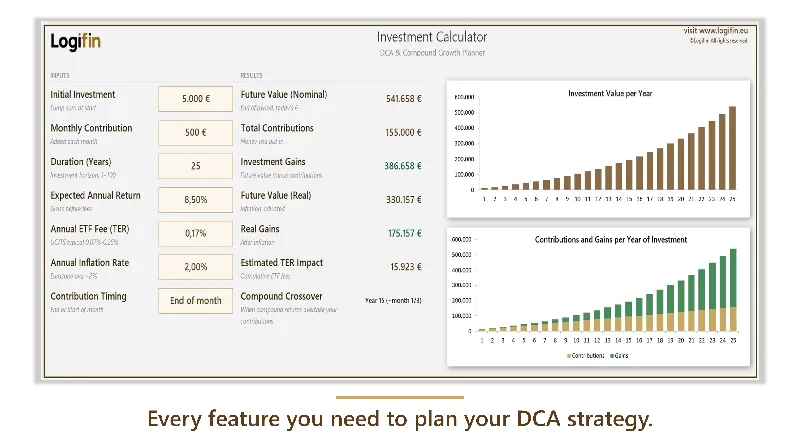
Investment Calculator
The calculation in your own sheet: open it wherever you like, show it to whoever you like.

Budget Tracker
Income, expenses and budget in a file you keep, month after month.

Portfolio Tracker
Take control of your investments across every broker and every asset, all in one file.
Frequently asked questions
What exactly do the Logifin tools do?
They answer three practical questions. The Investment Calculator shows where an amount you invest steadily can end up, with cost and inflation included in the maths. The Portfolio Tracker follows what you have already bought and works out your real return. The Budget Tracker shows where the money goes each month, so you know what is left to invest.
Do I need an account, a sign-up or an email?
No. You open the page and start working straight away. There is no registration, we do not ask for an email and no account is created anywhere.
Where are the numbers I enter stored?
Only in the browser on your own device. The data never leaves your computer or phone and we never see it. That also means if you clear your browser or switch devices, you will need to enter them again.
What is the difference between the online tools and the Excel ones?
The online tools run inside the page, need no installation and are free. The Excel files are downloads you keep for good: they work offline, you can adapt them however you like and they hold your history in a file that belongs to you.
Which tool should I start with?
If you have not invested yet, start with the Investment Calculator to see what the numbers mean over time. If you already hold positions, start with the Portfolio Tracker. If the question is how much you can set aside each month, start with the Budget Tracker.
Are the online tools really free?
Yes, with no usage limit and no hidden charge. There is no trial period that expires. The Premium Excel Tools are sold separately and are included in the annual Stay Ahead membership.
Are the results investment advice?
No. The tools run calculations on your own numbers and your own assumptions. They do not forecast markets and they do not suggest what to buy. They exist to help you understand the magnitudes, not to make the decision for you.
What to try next
The 3 template portfolios of the guides (Growth, Core and Balanced) with live returns.
→